How Translating a Children's Book Works
You wrote a picture book. The story works. The illustrations look the way you wanted them to look. You sold a few thousand copies in English, and now someone in your reviews has written "I wish my daughter could read this in Spanish."
So you start looking into translation. Two minutes later you discover that the localisation agencies who handle children's books charge between EUR 1,500 and EUR 5,000 per language. You consider Babelcube, the royalty-share platform that worked for some indie novelists. You read the fine print, realise that almost no Babelcube translator picks up a picture book because the production work is too high for the royalty split, and you close the tab.
This post is about a third option that did not exist three years ago: doing the whole job yourself, with AI, in an afternoon, for EUR 59. It is what LingoHop does. It is also a real, working pipeline that you can understand step by step, which matters because nobody should hand a book they spent two years on to a black box.
Why picture books are different
Almost every guide to translating a self-published book has been written with novels in mind. Novels are 60,000 to 100,000 words of running prose, almost all of it in flowing text that any modern translation engine handles well. The quality questions for a novel are stylistic: does the prose still sound like the author wrote it, does dialogue feel natural in the target language, does the rhythm hold up across a long manuscript.
A picture book is not that book. A typical picture book has 300 to 1,000 words of text and 16 to 40 pages of artwork. The text is short, repetitive, often rhythmic, and frequently set on top of the illustrations themselves. The cover title is hand-lettered. The shop sign in the background of page seven says "Bakery" in English. The dog in the corner has a name tag. Speech bubbles are shaped to fit specific lines of text. The book is not the words. The book is the words plus the pictures plus the way the words sit on the pictures.
That changes the translation job in three ways.
First, the volume of text per page is so low that the literary quality of the translation matters more, not less. A novel can absorb the occasional stiff sentence; a picture book where every word is read aloud cannot.
Second, illustration text is real text. The reader sees it. If your protagonist walks past a sign that says "Welcome" and you publish in Spanish without translating that sign, the German child who picks up your book in Hamburg sees something the author did not intend.
Third, the formats are different. Novels are reflowable EPUBs. Picture books are fixed-layout EPUBs, print-ready PDFs, or both. The translation has to land back in the same format, with the same page breaks, the same images in the same positions, and the same trim size if it is going to print.
Every step below is shaped by these three realities.
Step 1: upload your picture book
Upload an EPUB or a PDF. Reflowable EPUB if you have one (rare for picture books), fixed-layout EPUB for Kindle, or a print-ready PDF for IngramSpark or KDP print. The file goes to encrypted storage. No credit is spent on upload. Upload is always free.
If you have only the original layered source files (the InDesign document, or the layered Photoshop file from your illustrator), you have to export an EPUB or PDF first. Most picture book authors already have one of these because they needed it to publish in English. If you do not, your designer or illustrator can produce one in a few hours.
Step 2: pick a language and write your style notes
These two choices happen on the same upload form as the file itself, before any analysis runs.
You pick the target language. LingoHop supports 13 languages today: German, Spanish, French, Italian, Portuguese (Brazilian and European), Dutch, Polish, Russian, Turkish, Swedish, Danish, and Norwegian. The most common first choices for picture books are German and Spanish, because both markets are large, mature, and friendly to self-published children's books. If you are not sure where to start, our guide to which languages to translate your picture book into walks through how to weigh demand, market size, and distribution.
Then you write your style notes. For a picture book, two or three lines is usually enough. Examples:
For a read-aloud bedtime book: "Keep the rhythm gentle. The narrator is a warm, soft voice. Use short sentences. Address the child directly with the informal you in any language that has a formal/informal distinction."
For a comedy picture book with a sharp narrator: "Keep the narrator's voice dry and slightly cheeky. Do not smooth out short punchy sentences. The character speech should sound like real children."
For a rhyming picture book: "Translate the rhyming text as prose with strong rhythm. Do not force a rhyme; a forced rhyme reads worse than a clean non-rhyming line. The rhythm and the imagery matter more than the rhyme."
Style notes apply to the whole book. You can edit them later and re-run, but nine times out of ten you get them right the first time.
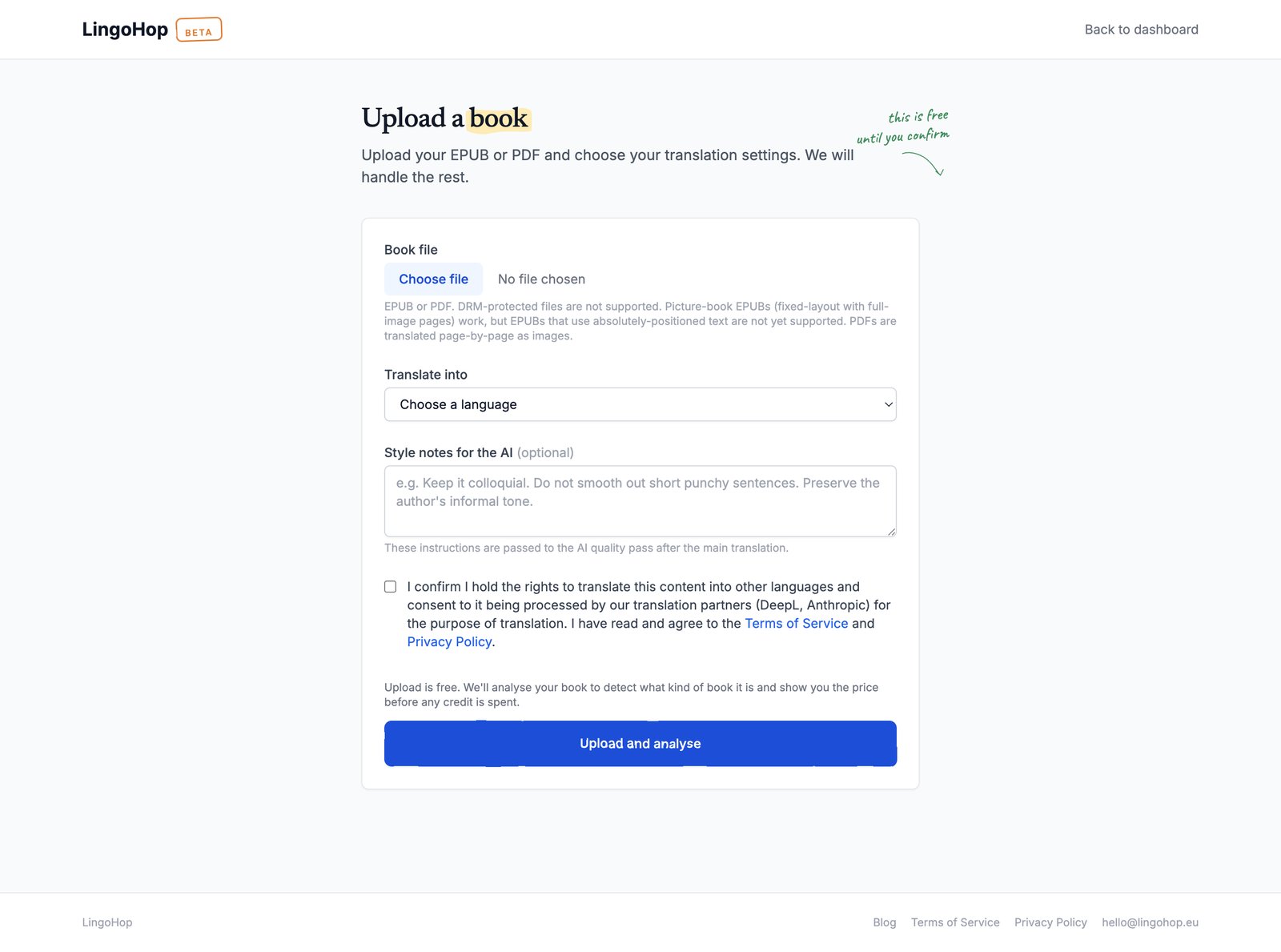
The upload form is the only screen where you make decisions before the analyser runs. Everything else is reviewable later.
Step 3: let the analyser look at your book
Once you submit the upload form, the analyser opens your file, counts the pages, finds every image, and runs OCR over each image to detect text inside the artwork. It also figures out which images are decorative (borders, ornaments, page numbers) and which images are storytelling images (covers, full spreads, vignettes with speech bubbles).
When the analyser finishes (typically under a minute for a 32-page picture book, longer for a heavily-illustrated chapter book), you get a summary screen. The summary tells you:
- The kind of book it is, in plain language: fixed-layout EPUB picture book, reflowable picture book with inline images, or a print-ready PDF.
- How many pages of text and how many pages of illustration the book contains.
- The exact price for the translation. For most picture books that is EUR 59. For very long picture books (more than 60 image pages) it is EUR 79. The price is fixed before you spend a credit, so nothing surprises you afterwards.
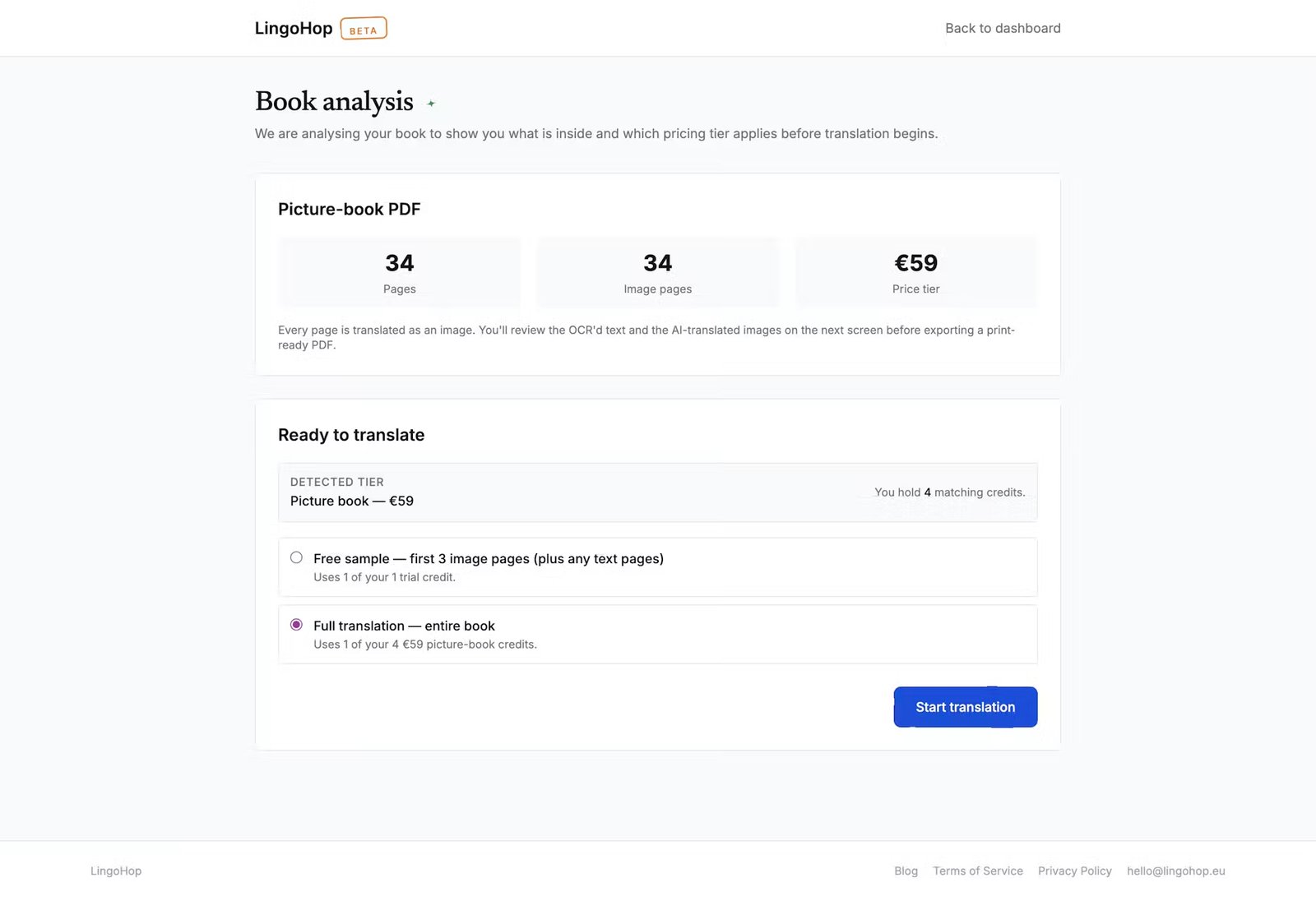
The analyser tells you what kind of book you uploaded and which tier applies, before any credit is spent.
Step 4: text translation runs in the background
Two passes. DeepL first, Claude second.
DeepL is a neural translation engine that has consistently outperformed Google Translate for European languages in industry benchmarks. It produces a fluent, correct translation of every line of text in your book. For picture book text the DeepL output is already very close to publishable. Where DeepL is weakest is in the small stylistic moves that make a sentence sound native rather than translated: the choice between two near-synonyms, the cadence of a short sentence, the swap of a literal idiom for the equivalent idiom in the target language.
Claude takes the DeepL output one chunk at a time and rewrites it with three specific goals: fix idioms that got translated word for word, restore rhythm and sentence variety, and respect the style notes you provided. It also leaves proper nouns alone (character names, place names, brand names) so your protagonist does not become a different person in Spanish.
For picture book text the Claude pass is where the read-aloud quality comes back. DeepL alone produces text that you could read aloud; Claude produces text that wants to be read aloud. The difference is small on the page but big when a parent is sitting on a bed at 8pm.
Step 5: illustration translation runs in the background
This is the bit nobody else does. While the text is being translated, a separate pipeline goes through every illustration in the book and edits the text on each one. An AI image model reads the original artwork and replaces the visible text with the translated version, keeping the rest of the picture intact: the layout, the fonts, the colours, the surrounding scene.
The honest version of this: most of the time it works very well. Clean cover-style text on a coloured background is the easy case and almost always comes back well. Banners and signs in interior spreads work well. Speech bubbles work well. Where the model is weakest is hand-lettered titles in highly ornate scripts, multi-line text where the line breaks are part of the design, and decorative typography where the letterforms themselves are part of the illustration. For those edge cases you can review the result and, on the review screen, decide image by image which translated versions to keep. We show real before and after examples of all of this, including the cases that do not work, in our post on translating picture book covers and illustrations.
The image pipeline runs in parallel with the text pipeline and typically finishes in 30 to 60 seconds per image. A 30-image picture book finishes in about 15 to 30 minutes of compute time. You do not have to sit and watch; the review screen will be ready when you come back.
Step 6: review every page
Now the part that actually matters. The review screen lays your book out as a grid of page cards, in the correct order, so you can see the whole book at once and work through it card by card.
For text pages, the original and translated paragraphs are shown next to each other. You can click any paragraph and edit it directly. If you speak the target language well enough, this is the moment to polish anything that sounds off. If you do not, you can save the review for a native speaker friend, or pay a freelance reviewer (post-edit rates are EUR 0.02 to EUR 0.05 per word, which is a couple of hundred euros for a typical picture book and the biggest single quality lever in the pipeline).
For image pages, a small Original / AI translated toggle sits above the artwork and swaps between the two versions without moving the image, which is the fastest way to see exactly what changed. You can preview the translated text on the artwork at the size it will appear in the exported book. You can switch back to the original image if a particular spread did not work out. You can regenerate the translated image with a different style if the first result was off. There is a "Mark as reviewed" button on every page that turns the page pill green so you can see at a glance what is done.
You can also write per-page instructions for the AI. "This page has the narrator speaking to the child directly; use the diminutive form for any noun addressed to the child." "The villain's speech bubble should sound more sinister." These instructions apply to a single page and re-run only that page, so you do not lose work you have already done on the rest of the book.
A careful review of a typical picture book takes 30 minutes to 2 hours depending on how much editing you want to do. It is also the only step that needs a real person sitting at the screen.
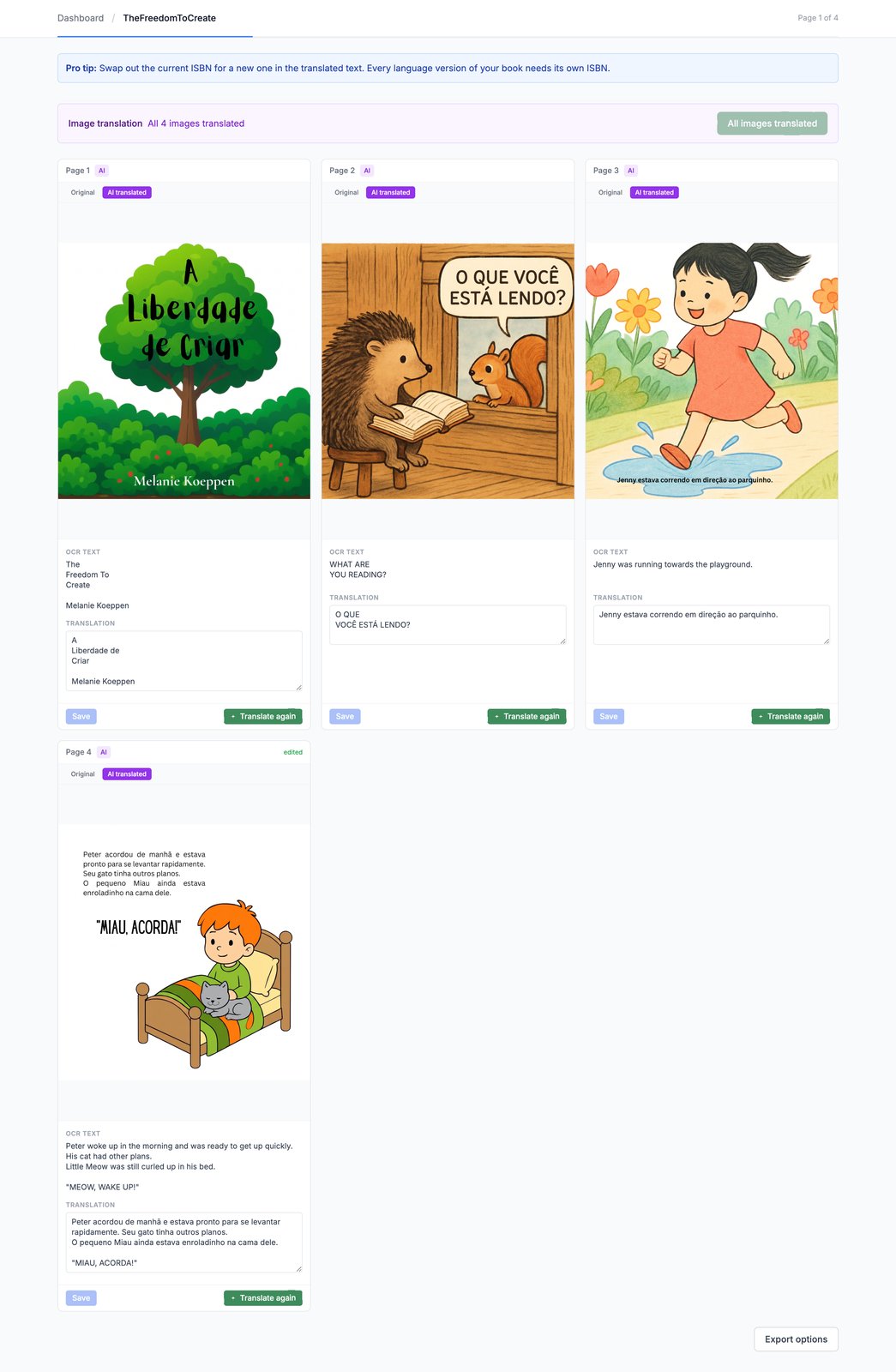
Every page of the book on one screen. Click any translation to edit it, switch between Original and AI translated on any illustration, and mark pages as reviewed as you go.
Step 7: export
You get back the same kind of file you uploaded. EPUB in, EPUB out. PDF in, PDF out. The translation does not change format; it changes language.
If you uploaded an EPUB (reflowable or fixed-layout), you export a translated EPUB. Same structure, same images in the same positions, same fonts where they were embedded, with all the text and all the illustration text now in the target language. Ready to upload to Amazon KDP, Apple Books, Kobo, and most other ebook stores.
If you uploaded a print-ready PDF, you export a translated print-ready PDF. The page geometry of your original is preserved exactly (page size, bleed, trim, rotation), and the artwork sits on each page at the same pixel size as in your source. This is the file you upload to IngramSpark or KDP Print.
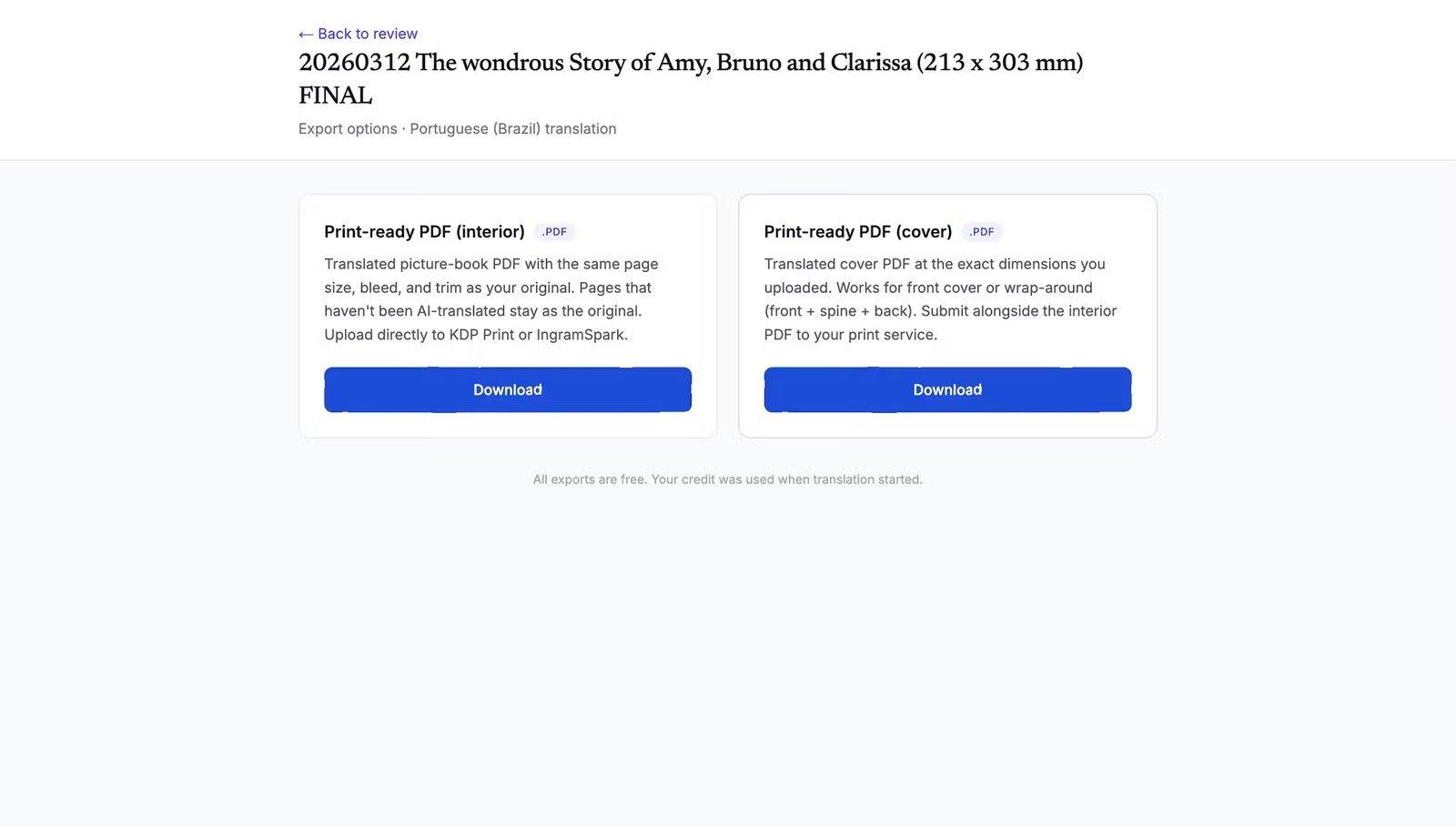
Print-ready PDF (interior) and a separate cover PDF, both at the exact dimensions of your original. Re-exporting is free for the lifetime of the project.
You can re-export later with your review edits, without spending another credit. Re-exporting is treated as the same job.
Step 8: publish
The translated book is now a separate edition with its own ASIN on Amazon and its own ISBN if you choose to register one. It has its own product page, its own keywords, its own price, and its own reviews to grow. It is yours.
How to actually upload to KDP and IngramSpark, including the per-marketplace gotchas, is the subject of a separate step-by-step post. The short version: treat the translated edition as a new book in your KDP dashboard, set the language correctly (this is the single most important field; KDP uses it for the marketplace, the category tree, and the search index), localise the metadata (title, subtitle, description, keywords, categories), and upload the files you exported above. Approval typically takes 12 to 72 hours.
What the whole thing actually costs
Two hours of your time on review (more if you are doing detailed editing). EUR 59 for the LingoHop credit (or EUR 79 if your book has more than 60 image pages). Optionally EUR 100 to EUR 400 for a native-speaker review pass on the translated text.
Compare that to the EUR 1,500 to EUR 5,000 you would pay a localisation agency to translate the same picture book into the same language, and the pattern becomes clear. The decision is no longer "can I afford to translate this book"; it is "which of my picture books, and into how many languages."
A typical first-time customer translates one book into one language to see how it feels. A typical returning customer translates the same book into four more languages over the next month, then starts working through their backlist. A small picture book backlist of ten titles, translated into German and Spanish (the two markets that most consistently buy English-language children's books in translation), is twenty translations and around EUR 1,200 of LingoHop credits. The same backlist would have cost EUR 30,000 through a localisation agency the year before LingoHop existed.
What we will not pretend to do
Three honest limits worth naming so you go in with the right expectations.
We do not preserve rhyme. A rhyming picture book translates into clean rhythmic prose with the same emotional beats, but the literal rhyme scheme is gone. If the rhyme is the whole point of your book, plan for a native-speaker poet pass on the translated text. We can give you a strong draft to start from; we cannot give you a finished rhyme.
We do not generate new artwork. The AI image step edits the existing illustration; it does not draw a new one. If your cover has hand-lettered title art that was painted as part of the illustration, the model will replace the letters but cannot guarantee they will be painted in exactly the same style. For those covers, a paid designer pass with your original layered source files (EUR 50 to EUR 200 per locale) is the cleaner option.
We do not yet support right-to-left languages (Arabic, Hebrew, Urdu, Farsi). Picture books in those languages also need the page order reversed, which is a different production job. We will get there; we are not there yet.
Where to go from here
If you want to see the pipeline run on your own book before committing, new LingoHop accounts include two free sample translations of the first few pages. Upload your picture book, pick a language, run the trial. You will see the translated text, the translated cover, and a couple of translated interior images in roughly half an hour. If the result looks right, you spend a credit and translate the whole book. If not, you have lost nothing.
That is the pipeline. That is what an afternoon and EUR 59 buys you in 2026. The rest is your story.
Melanie
Frequently asked questions
Can AI really translate the artwork in my picture book, or only the text?
Both. The text is translated by DeepL with a Claude polish pass; the artwork is edited by an AI image model that reads the original illustration, replaces the English text with the translated text, and keeps the rest of the picture untouched. Every image on the review screen has an Original / AI translated toggle, so you can flip between the two versions in place before you export, and you can revert to the original whenever you prefer the way it looked in English.
Will my illustrations be redrawn or regenerated?
No. The AI image model is asked to edit the existing artwork, not to draw a new picture. It replaces the visible text in the target language and leaves the rest of the illustration alone. The review screen lets you flip any image between Original and AI translated in the same frame, so anything that did not come back the way you wanted can be reverted before export.
What about rhyming picture books?
Rhyme is the single hardest case in any kind of book translation, and that is just as true for AI as it is for human translators. LingoHop produces a fluent, readable translation of rhyming text, but it will not preserve the original rhyme scheme. Most rhyming picture book authors who publish in a second language either accept that the translation is prose (with rhythm but not rhyme), or pay a native-speaker poet for a rhyming pass on top of the AI draft. We talk about this honestly in a separate post on translation quality.
What file format do I upload?
EPUB (reflowable or fixed-layout) or a print-ready PDF. Most picture book authors have a fixed-layout EPUB for Kindle and a PDF for IngramSpark or KDP print. Either format works. The analyser detects which kind of book you have, counts the image pages, and tells you the right tier before you spend a credit.
How long does the whole process take?
An afternoon, end to end, per language. The machine work (DeepL plus Claude plus AI image edits) typically takes 30 to 90 minutes depending on the number of illustrations. The review step, where you read every page, check the artwork, and edit anything that does not land, takes another hour or two. After that you export an EPUB or a print-ready PDF and upload it to KDP or IngramSpark.
Do I keep the rights to the translated book?
Yes. The translation is yours. You publish it under your own author name, on your own KDP and IngramSpark accounts, with your own pricing. There is no royalty share, no exclusivity period, and no licence back to LingoHop. You can also re-export at any time without spending another credit if you find a typo in the German edition six months from now.